
Docs/Automation & routing/Sending a Message from Process Builder
Sending a Message from Process Builder
ValueText can send a message from a Salesforce Process Builder action by choosing record creation, instead of using the Send SMS button. Each action sets a Message Bucket or SMS Outbox record with four fields that tell ValueText what to send and where.
Last updated 28 Nov 2025Sending a Message from Process Builder
A message can be triggered from a Process Builder action by choosing record creation. For example, changing a loan status to "approved" can trigger a message to the customer without using the Send SMS button.
There are various scenarios where a message can be set to trigger a Process Builder action.
To send a message from Process Builder:
- Define the flow condition. Set the condition for when your Process Builder action should fire.
- Choose the action type. Select Record Creation under Immediate Actions or Scheduled Actions.
- Select the message object. Choose either Message Bucket or SMS Outbox, based on the version you are using.
- Define the fields. Configure the following four fields as shown below.
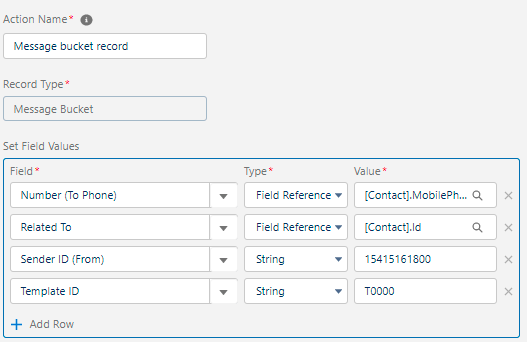
- Number (To Phone): choose Field Reference and set the value to
[Contact].MobilePhone. - Related To: choose Field Reference and set the value to
[Contact].Id. This helps create a history of the SMS. - Sender ID: choose either the from address or your Sender ID for the message. Check your Sender ID tab for the correct value.
- Template ID: enter the name of the template you have created. Make sure it is not the Salesforce ID of the template record.
Custom and standard objects can both be configured under the Process Builder message.
Was this helpful?